Tuesday, September 13, 2016
Blu-Ray Authoring Software for Wedding Videos
Blu-ray Creator - Best Blu-ray Burning Software Free Download
Has a menu designer and supports almost every available video format, so it doesn't matter what video editor you use to export your completed videos.
Caveat: this appears to be a
Adobe Encore CS6
Must be purchased with a creative cloud membership now (as part of Adobe Premiere) because the disc version of the software has not been available for over two years.
Many professional video editors use Encore as their go-to for DVD and Blu-Ray authoring, but it does have a learning curve if you're not familiar with Adobe applications.
Thankfully you can overcome this learning curve by watching a few Youtube videos to learn the interface:
Part 1 of 3: Blu-ray Authoring and Adobe Encore Basics - YouTube
Adobe Encore Basics 2: Creating Menus - Duration: 7:30
Sony DVD Architect Pro 6.0 (at B&H Photo Video)
Can author both DVDs and Blu-Rays
$150
Doesn't appear to require any other software, as long as you can feed it your final edit exported from your video editor of choice. This seems like it would be a comparable alternative to Adobe Encore.
"supports popular video and audio formats such as AVI, MPEG-1, MPEG-2, and AVCHD so you can make a DVD or Blu-ray disc that will play on almost any DVD/BD player or DVD/BD-capable computer."
DVD Architect - creating DVD Menus - YouTube
PowerProducer 6 | CyberLink
$80 (Ultra version that can author blu-rays). On sale for $63.
A less expensive option that may not provide as many deep options as Sony's DVD Architect, but will get you burning discs at about half the price. Supports many different common video formats:
AVI/ 3GPP (3g2, 3gp)/ VOB / FLV/ MOD/ MKV/ MPEG/ MPEG-2 Transport Stream(m2t, m2ts, mts, tod, tpd)/ MPEG-2 TV Recorded (trp, ts)/ MPEG-4 AVC (MOV)/ MPEG-4 Video (MP4)/ Video CD (DAT)/ VRO/ ASF/WMV/ Windows Media Center Recorded (dvr-ms, WTV)
* Can create video slideshows from your JPEG or RAW photos.
Tips for Blu-Ray authoring:
Use high-quality, reliable media. Getting the cheapest discs possible may actually cost you in the long run because their lifespan will be shorter and you'll have more discs that fail to burn, leaving you with a coaster.
Deciding on encoding format. In your video editor, you can export either MPEG-2 for Blu-Ray or H.264 for Blu-Ray. MPEG-2 can be used for videos that are one hour or less. If your videos are longer, use the H.264 encoding options.
Authoring Blu-ray Discs | Videomaker.com

Thursday, August 25, 2016
Keepsake CD and DVD Cases
Present your wedding DVDs to the client in style with keepsake cases that look much more thoughtful than regular, mere CD case.
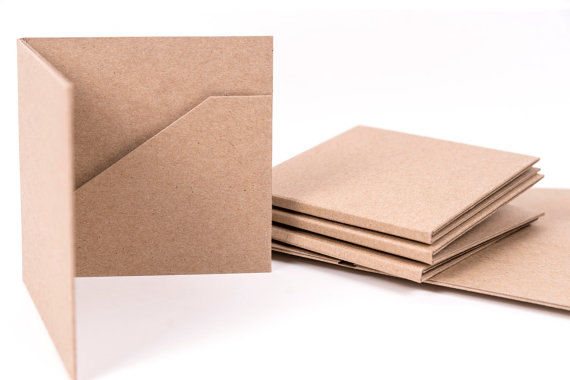
10 Kraft CD Cases 2 Pocket Wedding Favor by FancyThatLoved
$9.25 for set of 10, ships from U.S.
Nice option to have available in a pinch. Only holds one disc.
Set of 20 is $18.50 + $6.50 shipping = $1.25 each

Alder Wood DVD case (single disc) by WadeCreations - Etsy
$37 + $7 shipping, ships from the U.S.
The best price I've found for a wooden DVD case that can also have personalized engraving if desired. Most of the other wood cases are $45-50.

Professional CD/DVD Case Videographer Packaging by eitsart on Etsy
$16.45 (including shipping) each from the U.S. (Takes 1-2 weeks to produce.)
Nice option if wooden cases are too expensive. Includes one ribbon. White ribbon looks nice against the dark fabric color.


10 Kraft CD Cases 2 Pocket Wedding Favor by FancyThatLoved
$9.25 for set of 10, ships from U.S.
Nice option to have available in a pinch. Only holds one disc.
Set of 20 is $18.50 + $6.50 shipping = $1.25 each
Alder Wood DVD case (single disc) by WadeCreations - Etsy
$37 + $7 shipping, ships from the U.S.
The best price I've found for a wooden DVD case that can also have personalized engraving if desired. Most of the other wood cases are $45-50.

Professional CD/DVD Case Videographer Packaging by eitsart on Etsy
$16.45 (including shipping) each from the U.S. (Takes 1-2 weeks to produce.)
Nice option if wooden cases are too expensive. Includes one ribbon. White ribbon looks nice against the dark fabric color.


Wednesday, July 6, 2016
77mm Neutral Density Filters for Outdoor Filming
For filming weddings and other outdoor shoots, a Neutral Density filter is a must-have.
Outdoor filming requires about 6-10 stops of light reduction to allow filming at wide apertures (below f/8).

Breakthrough Photography 77mm X2 Solid Neutral X2-ND6-77MM
$99
Each glass surface includes four layers of anti-reflection coating
Nano coating provides an improved beading effect with water
Hoya 77mm ProND64 Filter XPD-77ND64 B&H Photo Video
$83
4.5/5 stars
Metallic ACCU-ND Coating
One-Piece Aluminum Ring
Tiffen 77mm Digital Neutral Density Filter Kit 77NDK3 B&H Photo
$119
4.5/5 stars
Neutral Density 0.6, 0.9, 1.2 Filters
Hoya 77mm Pro 1 Digital Neutral Density 64x Filter XD77ND64 B&H
$120
Almost 5/5 stars
B+W 77mm SC 106 Solid Neutral Density 1.8 Filter (6 Stop)
$73
4.5/5 stars
(single coated)
Brass filter ring
Outdoor filming requires about 6-10 stops of light reduction to allow filming at wide apertures (below f/8).
Breakthrough Photography 77mm X2 Solid Neutral X2-ND6-77MM
$99
Each glass surface includes four layers of anti-reflection coating
Nano coating provides an improved beading effect with water
Hoya 77mm ProND64 Filter XPD-77ND64 B&H Photo Video
$83
4.5/5 stars
Metallic ACCU-ND Coating
One-Piece Aluminum Ring
Tiffen 77mm Digital Neutral Density Filter Kit 77NDK3 B&H Photo
$119
4.5/5 stars
Neutral Density 0.6, 0.9, 1.2 Filters
Hoya 77mm Pro 1 Digital Neutral Density 64x Filter XD77ND64 B&H
$120
Almost 5/5 stars
B+W 77mm SC 106 Solid Neutral Density 1.8 Filter (6 Stop)
$73
4.5/5 stars
(single coated)
Brass filter ring
Sunday, June 19, 2016
Wedding Videography Bootcamp
How to book a wedding video (marketing yourself)
Griffin had tried a bridal show and business cards, but most of his weddings come from word of mouth. There are over 100 guests at an average wedding, and chances are good that some of those guests will be getting married soon. If you can get one wedding on your reel, more will follow. Make sure everyone knows that you're a talented videographer who wants to shoot weddings.Great Wedding Videos Tell a Story
Short interviews with the bride and groom are a great way to capture their energy and the love they share. You can weave their voices from these interviews throughout wedding highlight videos.Setup Professionally
Allow about an hour before the ceremony to setup cameras and audio equipment. This provides enough time to ensure that everything is ready to record at a moment's notice, and sometimes this is all you have!Capture the Ceremony, Toasts, and Dances with Multiple Cameras
Use at least two cameras for the ceremony: a wide camera in the back and a close-up camera positioned on the right to show the bride's face. One you push record, don't stop until the end of your ceremony (or until your DSLR clip length limit is reached). This makes sound syncing much faster, because you'll only have to sync one time if all your cameras are continuously recording.
Be a Team Player
Introduce yourself to the other people working the wedding. You'll be interacting the most with the photographer, DJ, and wedding planner/coordinator. The photographer will be directing some great moments from the couple and bridal party. This is an opportune time to get some of the best shots of the day.Protect Yourself From Mistakes
- Bring extension cables so you won't run out of battery.
- Have three or more camera batteries (DSLRs burn through batteries quickly when shooting video)
- Bring enough memory cards for all your cameras so you are never hesitating to record.
- Bring a battery charger. (I have three batteries for my DSLR, but could have run out of battery power if I hadn't charged the second drained battery in the middle of the day.)
Capture as Much Audio as Possible
capture ambient audio to work into the wedding highlight video and long DVD film.Connect to the DJ's Sound Board
Bring all three audio cable types (XLR, 1/4", and RCA) so that you can connect to the sound system no matter which output is available.
Use Your Fastest Lens During the Reception to Capture Great Images in Low Light
Use an F/2.8 or faster lens to give your camera as much light as possible when filming indoor scenes during the reception.How to Edit
When Griffin Hammond was a wedding videographer, he took about 5 hours of raw video and cut it down to a 1 hour wedding film.Shots Don't Have to Be Perfect
"Even if your shots aren't perfect, you're capturing a beautiful day in two people's lives, so they will love watching the video you produce and reliving those moments." ~ Griffin HammondProfessional Quality Wedding Ceremony Audio Recording for $125


...
How to Establish Your Wedding Videography Pricing
Where to Find Free Music for Your Video Productions
Tuesday, April 12, 2016
Techniques for Making a Documentary Promotional Video
My First Documentary Promo Video and What I Learned - YouTube
by Dave Dougdale.
Film your interview with two cameras so you can cut between them for added interest and professional production value. Don't have two cameras? Borrow a friend's GoPro, or rent one on the cheap to give yourself extra options when editing.
Show your subject in action.
Show moments that express your subject's unique personality.
by Dave Dougdale.
Film your interview with two cameras so you can cut between them for added interest and professional production value. Don't have two cameras? Borrow a friend's GoPro, or rent one on the cheap to give yourself extra options when editing.
Show your subject in action.
Show moments that express your subject's unique personality.
Saturday, March 19, 2016
Make Your Own Ambient Audio Tracks for Video
When the right kind of electronic or ambient music is not available for your project, why not create your own?
Stretching a piano, guitar, or other single/double instrument song can sound interesting and tones and drones when done right.
To create your own custom stretched music tracks, check out Paul's Extreme Sound Stretch. It's available for PC and Linux.
If the sound of an enlongated song is not to your taste, another option is to generate your own instrumentation or chorus sounds with ZynAddSubFX. It's an open source music generator for PC, Mac, and Linux:
Stretching a piano, guitar, or other single/double instrument song can sound interesting and tones and drones when done right.
 |
| Paul's Extreme Sound Stretch |
To create your own custom stretched music tracks, check out Paul's Extreme Sound Stretch. It's available for PC and Linux.
 |
| ZynAddSubFX (open source music generator) |
If the sound of an enlongated song is not to your taste, another option is to generate your own instrumentation or chorus sounds with ZynAddSubFX. It's an open source music generator for PC, Mac, and Linux:
a fully featured open source software synthesizer capable of making a countless number of instruments, from some common heard from expensive hardware to interesting sounds that you'll boost to an amazing universe of sounds.
Wednesday, March 16, 2016
Discover Sharjah Through a Cinematic Journey
SOUL OF SHARJAH from Michael Beech on Vimeo.
An incredible, sweeping cinematic and auditory journey through Sharjah, a city of 1.4 million people in the United Arab Emirates.
Subscribe to:
Posts (Atom)